Break the 4-device limit. Empower multiple admins, users, and sales representatives to chat concurrently from a single WhatsApp number. Sync chats in real-time with zero per-message markup.
Start Your Free Trial Now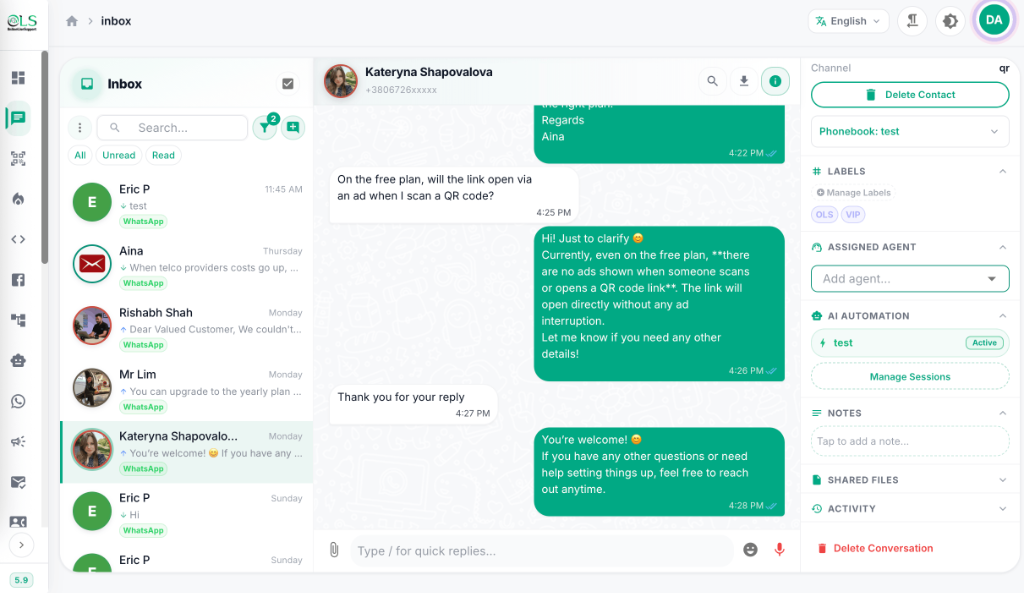
Equip your customer support team with shared dashboards for multiple users on any number of mobile phones.
Onboard unlimited support agents, set unique role-based access permissions, and segment chat queues to avoid agent overlaps.
Connect and reply from as many primary smartphones as you need. Perfect for sales teams on the field who need live mobile CRM access.
Aggregate all your distinct support numbers and country accounts under one central login, eliminating tab-switching fatigue.
See how OnlineLiveSupport helps your team collaborate without hitting annoying device or user thresholds.
Severe device, user, and reporting constraints.
A fully synchronized support platform for your entire company.
Yes! Native WhatsApp Business limits you to only 1 primary phone. OnlineLiveSupport breaks this barrier, allowing your entire team of agents to connect to the exact same WhatsApp number simultaneously from any phone, tablet, or web browser.
By linking your WhatsApp Business number to the OnlineLiveSupport CRM dashboard, you can define individual agent and admin profiles. You can assign permissions, manage workflows, and route support chats transparently under one shared team number.
Native WhatsApp Business allows a maximum of 4 linked devices, and they cannot all be primary smartphones. OnlineLiveSupport CRM completely eliminates this restriction, letting an unlimited number of agents and phones handle support concurrently.
Inside the OnlineLiveSupport dashboard, you can connect multiple distinct WhatsApp accounts using QR code connection or the official Meta WABA Cloud API. This aggregates all numbers into a single central interface.
Absolutely. OLS features real-time synchronization. When an agent opens or responds to a message, it is marked on all other agents' screens instantly, preventing duplicate answers and increasing team efficiency.
Unlike other tools that charge expensive markups per message, OLS offers flat-rate subscriptions from just $1/day, zero per-message fees, built-in AI chatbots, and complete Google Sheets synchronization.