WhatsApp QR: The Easiest Way to Connect Your Business Account


A WhatsApp QR code is the simplest way to connect your WhatsApp account to a platform without manual login or complex setups. By scanning a unique QR code, businesses can instantly Link their WhatsApp account, Launch campaigns quickly, Manage customer conversations securely

It’s fast, secure, and beginner-friendly, making it the preferred option for businesses that don’t want to waste time on technical setups.

WhatsApp QR

Key Features of WhatsApp QR in Online Live Support

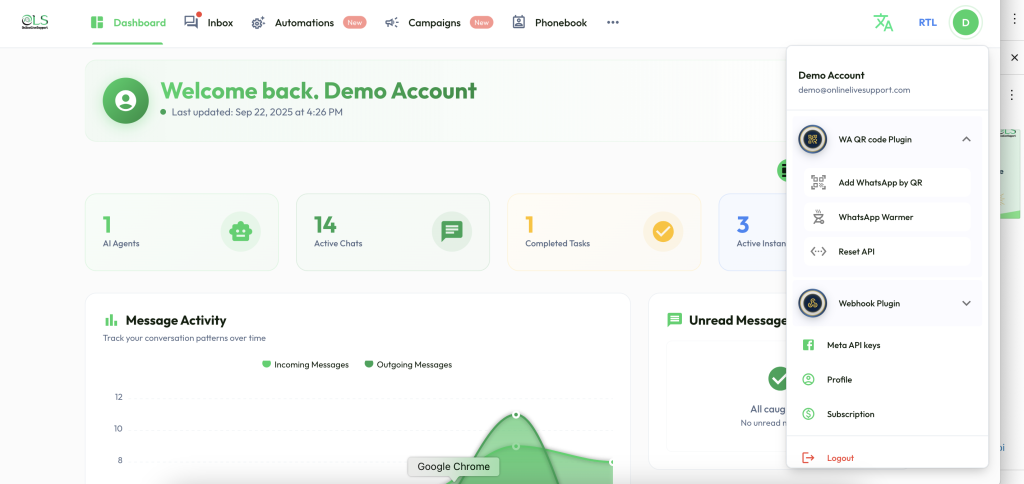
From the WA QR code Plugin, you’ll find powerful tools that make WhatsApp setup and scaling easier:

1. Add WhatsApp by QR

Forget about long, manual configurations. Just scan the QR code, and your WhatsApp account connects instantly.

✅ Quick setup in seconds
✅ No developer skills required
✅ Safe & secure login

2. WhatsApp Warmer

Brand-new WhatsApp numbers often get restricted if used heavily at the start. The WhatsApp Warmer solves this by gradually building trust with WhatsApp.

✅ Sends controlled messages automatically
✅ Prevents bans and restrictions
✅ Makes your number “campaign-ready”

3. Reset API

If you need a fresh start or want to switch accounts, the Reset API option gives you a clean slate.

✅ Refresh your connection instantly
✅ Fix integration errors
✅ Maintain seamless operations

Click on the on D button in the right corner, there you would be able to see all options

Why Businesses Need WhatsApp QR

  • Instant Onboarding – No delays, just scan and go.

  • Secure Login – Your data stays safe while connecting.

  • Campaign Ready – With warming and reset options, you’re always prepared.

  • Non-Technical Friendly – Business owners can set it up without IT teams.

Frequently Asked Questions (FAQs)

How does WhatsApp QR work?

By scanning a QR code, your WhatsApp account connects securely to the platform for instant access.

New numbers are at risk of getting blocked. The warmer ensures your number gains trust by sending messages gradually

Yes, with the Reset API feature, you can refresh your account connection whenever needed.

Leave a Comment

Your email address will not be published. Required fields are marked *

Scroll to Top